The installation altitude has not been set correctly.
Set the altitude (P40) as follows:
Calling up settings
There must not be any cookware on the cooktop.
Turn off the cooktop.
Touch On/Off for approx. 6 seconds. The seconds can be seen counting down in the cooktop display.
The cooktop display shows .
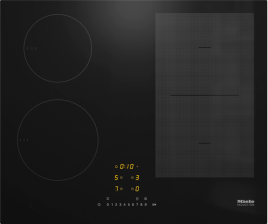
The cooking zone/cookware displays show:
and a number indicate the selected quick parameter
depending on the model:
and a number indicate the selected code of the selected quick parameter
Other sensor controls light up.
The NFC icon display lights up brightly.
Touch Stop&Go.
The cooktop display shows .
The cooking zone/cookware displays show:
and a number indicate the selected parameter.
Setting parameters
Touch Plus or the slider on the top right next to the cooktop display repeatedly until the corresponding cooking zone/cookware display shows P40.
Touch OK.
The slider, OK, and Plus on the bottom right next to the cooktop display light up.
The cooking zone/cookware display on the bottom right next to the cooktop display shows the currently set code number.
Setting the code
Touch Plus on the bottom right next to the cooktop display repeatedly until the required code number is displayed in the corresponding cooking zone/cookware display.
C00: 0–300 m
C01: 301–600 m
C02: 601–900 m
C03: 901–1,200 m
C04: 1,201–1,500 m
C05: 1,501–1,800 m
C06: >1,800 m
C07: 0–1,800 m
Touch OK.
The setting is saved. You can now exit the settings or adjust further settings.
Touch On/Off.


